Asoftech Automation vs Auto Clicker: Which Windows Tool Fits Your Task?
Asoftech |
Repeated desktop work can mean two different things: clicking the same controls, or performing a longer sequence with typing, windows and files. Asoftech offers a tool for each job. This guide helps you choose a practical starting point.
Choose the tool that matches the actions
Asoftech Automation — Asoftech Automation records mouse and keyboard actions as a macro. You can edit the steps, replay them, repeat them at an interval or schedule a start time. It is useful when your routine includes both clicks and keystrokes.
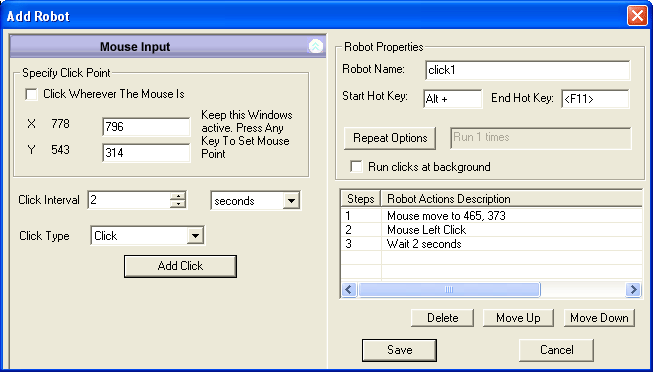
Asoftech Auto Clicker — Asoftech Auto Clicker saves one or more mouse clicks as a robot. You can set the click locations, timing and repeats, start it with a keyboard shortcut or schedule it. It suits a predictable task made mainly of clicks.
A quick decision guide
Choose a click robot when you need repeated clicks at one or several stable positions.
Choose a recorded macro when the routine also types text, opens a document or moves between applications.
If the interface changes often, keep the routine short and check every run before relying on it.
Build and test one small routine
Write down the expected result and prepare a sample file or test application.
Record a short macro or save a click robot with a small repeat count.
Run it once while watching the target window. Check click positions, typing and the result.
Edit unnecessary steps or adjust click timing. Only then choose a shortcut, interval or scheduled start.
Keep playback dependable
A click robot needs its target controls in the expected places. Screen scaling, a moved window or a redesigned page can change the result. Asoftech Automation includes RecWin handling for changes in window position and size, but you should still retest after application updates. Keep a way to stop playback and inspect the output before using it in regular work.
Frequently asked questions
Can Auto Clicker type text?
For a routine that includes keyboard input, use Asoftech Automation and record a mouse-and-keyboard macro. Auto Clicker is designed around mouse clicks.
Should I schedule my first run?
Run the routine manually and check its result first. Scheduling makes sense once the starting screen and timing are dependable.
Start with the right tool
Explore Asoftech Auto Clicker for click-only robots, or Asoftech Automation for a recorded mouse-and-keyboard workflow. Start with a small test you can verify.