Asoftech Logo
| Sitemap |      
   line Home line Products line Support line Knowledge line Contact Us line    


Install Asoftech Products

Product Questions

1) How to proceed for installation when I see this Windows Protected PC message?


1. How to proceed for installation when I see this Windows Protected PC message?

After download Asoftech product software from our website, or after purchase and download the installer, when you double click to install it, you may see this error message.
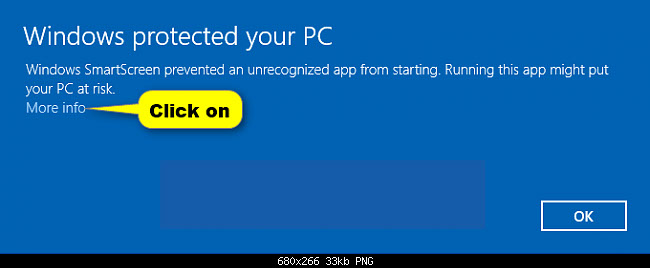

(2) Click "More info", and then choose "Run Anyway".
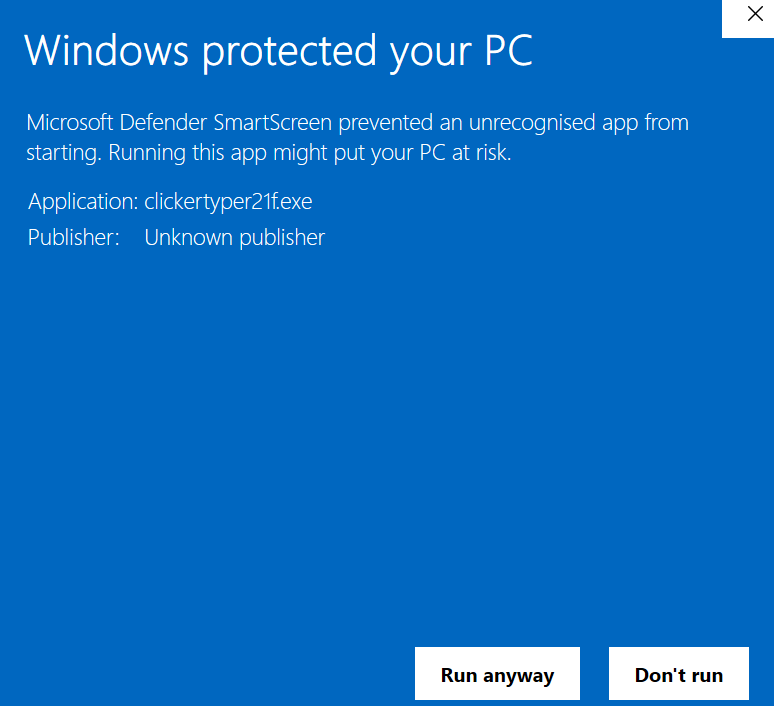

Follow on screen steps and you can now install Asoftech Product successfully on your computer.


Should you still any problems, please contact us.


| Home | Products | Support | News | Contact Us | Sitemap |


Copyright ©2026 asoftech. All Rights Reserved.


Products

Youtube Downloader

Video Converter Asoftech

Asoftech Photo Recovery

Asofech Data Recovery

Asoftech Automation

AutoHomeMovie

AutoMe

Asofech Speeder

Auto Clicker Asofech

Auto Typer Asofech

Auto Clicker and Typer 2 in 1


Technology

RecWin Technology

Advanced Carving Technology


Tips

Memory Card Recovery

Mobile Phone Data Recovery

Recover Photo from Camera

Recover Files Deleted From Recycle Bin

Format Recovery

USB Data Recovery


More Information

Increase Productivity

Press Room

Privacy Policy