How to Recover Deleted Files: Step-by-Step (Asoftech Data Recovery)
Published - Estimated read: 4 min
Lost a file? Don't panic. This guide walks you through recovering deleted files from Windows PCs, USB flash drives, SD cards and external disks using Asoftech Data Recovery. Follow these steps to maximize your chance of getting data back.
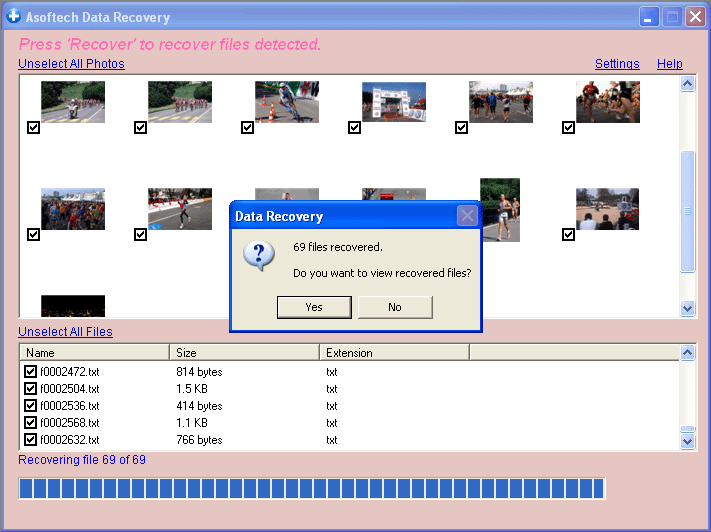
Asoftech Data Recovery scanning a connected drive (example screenshot).
Why deleted files are often recoverable
When a file is deleted, most storage systems simply mark the space as available. Until that space is overwritten by new data, recovery tools can locate and restore the original content. That's why stop using the affected drive immediately after noticing data loss.
Before you begin - important safety tips
Stop writing to the drive. Installing or saving files to the same drive reduces recovery chances.
Use a different PC or different drive for installing recovery software if possible.
Work from a backup if you have one - restoration is always preferable to recovery software.
Step-by-step: Recover deleted files with Asoftech Data Recovery
Download and install - Get Asoftech Data Recovery from the official site and install it on a different drive than the one you want to scan.
Connect the affected device - If recovering from an SD card or USB stick, attach it to your computer now.
Start the program - Launch Asoftech Data Recovery and choose the device or drive from the list of available volumes.
Run a scan - Choose a Quick Scan first to locate recently deleted items. If that doesn't find your files, run a Deep (or Full) Scan - it takes longer but finds more.
Preview results - Use the built-in preview to check images, documents and videos so you restore the correct files.
Recover to a safe location - Save recovered files to a different drive or external disk to avoid overwriting remaining deleted data.
What to do if the Quick Scan doesn't find your files
Run the Deep (Full) Scan - it reads the disk sector-by-sector and can reconstruct files from file signatures. This is slower but more thorough. If the target drive shows physical faults (clicking, failing to mount), stop and consult a professional data-recovery service - do not continue software attempts which can cause more damage.
File types and device support
Asoftech Data Recovery supports common file formats including DOC/DOCX, XLS/XLSX, PDF, JPG, PNG, MP4, MOV, MP3 and ZIP/7Z archives. Supported devices include HDDs, SSDs, USB flash drives, SD/microSD cards and many camera media formats.
Maximize recovery success - checklist
Try recovery as soon as possible after deletion.
Use Quick Scan first, then Deep Scan if needed.
Recover files to a different physical drive.
If the drive is physically damaged, stop and seek a professional service.
Keep multiple backups to avoid recovery scenarios in the future.
Common FAQs
Can I recover files from an SSD?
Possibly, but SSDs using TRIM may reduce recovery chances because deleted blocks are actively zeroed out. Try recovery immediately and avoid write operations.
Is there a risk in using recovery software?
Software itself is generally safe, but installing it to the affected drive or repeatedly writing to the drive can overwrite recoverable data. Always install and save recovered files to a different drive.
Wrapping up
Data loss is stressful, but many deleted files can be restored if you act quickly and follow best practices. Asoftech Data Recovery is a convenient option for Windows users - simple enough for non-technical people, with deeper scan options when you need them.
Final Words
Whether you lost files due to accidental deletion, formatting, or corruption, Asoftech Data Recovery is a powerful and user-friendly tool for retrieving data from USB drives on Windows. With just a few clicks, you can bring back valuable files that seemed lost forever.
If you're dealing with lost USB data - don't panic. Download Asoftech and give your recovery a strong chance.
You can recover your deleted files worldwild as you can do it by yourself on your computer. So you do not need to go to data recovery centres, looking for data recovery services from specialists. You can performa data recovery and photo recovery worldwide, including countries Japan, USA, UK, Canada, Australia, New Zealand, India, Pakistan, Nigeria, Philippines, Germany, Bangladesh, Egypt, France, Italy, Thailand, Netherlands, Nepal, South Africa, Poland, Turkey, Iraq, Spain, Sweden, Kenya, Cameroon, Malaysia, Russia, Belgium, Israel, Austria, long island, Romania, Zimbabwe, Greece, Sierra Leone, Mexico, Denmark, Switzerland, Morocco, Norway, Ireland, Singapore, Ghana, Tanzania, Finland, Portugal, Liberia, Jordan, Algeria, Jamaica, Guinea, Uganda, Hong Kong, Czech Republic, Argentina, Yemen, Croatia, in cities such as chennai, bangalore, toronto, mississauga, delhi, kolkata, mumbai, pune, dubai, london, nottingham, hyderabad, Sheffield, Croydon, Barking, Bristol, Manchester, Watford, Luton, Dartford, Gatwick, Reading, Norwich, Chelmsford, Newhaven, Northampton, Southampton, Nottingham, Derby, Abingdon, Gloucester, Bury St Edmunds, Exeter, Los Angeles, Melbourne, Chicago, Houston, Perth, Philadelphia, Phoenix, San Francisco, Detroit, San Jose, Dallas, kenya, birmingham, finchley, vancouver, canada, montreal, ottawa, calgary, winnipeg, Australia, sydney, melboune, brisbane, auckland, hamilton, waikato, Atlanta, Boston, Riverside, Seattle, Minneapolis, Tampa, St. Louis, Baltimore, San Antonio, Delaware, Denver, Charlotte, Pittsburgh, Portland, West Midlands, Greater Bristol, Cardiff, Greater Glasgow, West Yorkshire, Bradford, Leeds, Liverpool, Greater Manchester, Nottingham-Derby, Portsmouth-Southampton, South Yorkshire (Sheffield), Newcastle-Sunderland, Paris, Randstad, Istanbul, Moscow, Saint Petersburg, Berlin, Madrid, Rome, Kiev, Bucharest, Minsk, Vienna, Hamburg, Budapest, Warsaw, Barcelona, Kharkiv, Munich, Milan, and states Alabama, Alaska, Arizona, Arkansas, California, Colorado, Connecticut, San Diego, Miami, Florida, Georgia, Hawaii, Idaho, Illinois, Indiana, Iowa, Kansas, Kentucky, Louisiana, Maine, Maryland, Massachusetts, Michigan, Minnesota, Mississippi, Missouri, Montana, Nebraska, Nevada, New Hampshire, New Jersey, New Mexico, New York, North Carolina, North Dakota, Ohio, Oklahoma, Oregon, Pennsylvania, Rhode Island, South Carolina, South Dakota, Tennessee, Texas, Utah, Vermont, Virginia, Washington, West Virginia, Wisconsin, Wyoming.